

HireHop Product Updates (“Bumper” Edition): New Business Central Integration, Availability Grid and Speed Boosts
It’s been a landmark year at HireHop! Our focus has always been simple: building the tools that help rental businesses run more smoothly. Over the last 12 months, we have been working quietly behind the scenes to overhaul our framework, increase system speed and add the features you’ve been asking for.
In this “bumper” product updates article, we’ll walk you through each new and improved feature one by one.
Let’s dive in.
What’s New In HireHop?
1. Enterprise-Grade Financials & Accounting
We’ve added layers of sophistication to how you handle your money.
Microsoft Dynamics 365 Business Central Integration: For our enterprise users, HireHop now syncs seamlessly with Business Central. We’ve also added FreeAgent and Exact to our growing list of accounting integrations.You can read more about our Business Central integration here, and view all of our accounting integrations here.
Advanced Depreciation: Comply with international accounting standards with our new depreciation features. Set residual values (including % of purchase price) and manage bulk assets without cluttering your accounting software.

Tracking Categories and Accounting Departments: You can now pull tracking categories and accounting departments from your accounting software. These can be applied to invoices, credit notes, and POs, providing an extra layer of granular reporting alongside nominal codes.
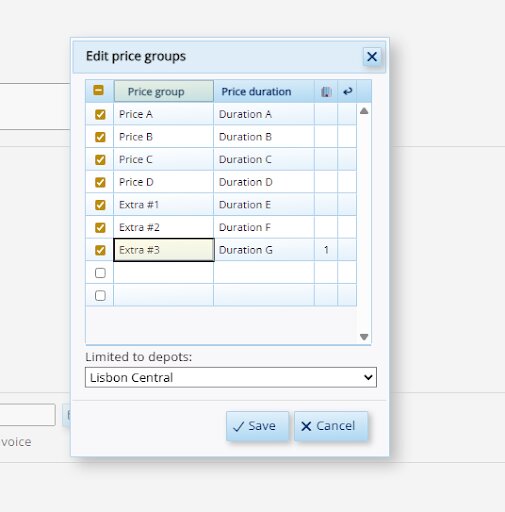
Unlimited Price Groups: You can now create as many price groups as you need and limit them to specific depots or virtual depots. This also supports multi-currency setups, allowing you to set localised pricing across different territories (e.g., £10 in the UK, €10 in France, and $10 in the USA).
Enhanced Credit Periods: Set due dates with total flexibility—whether it’s the last Friday of the month or a specific number of months from the start of the next month.

eInvoice Compliance: Stay ahead of EU regulations. You can now download compliant eInvoices for government approval.

Stripe for Drafts: Once a Stripe payment is taken for a draft invoice, the invoice is approved and synchronised. You can also optionally set jobs to automatically authorise upon payment, removing manual steps from your workflow.

2. Warehouse & Asset Management Efficiency
The “heavy lifting” just got lighter.
The All-New Availability Grid: It’s faster, scrolls up to a year ahead and features an expandable Gantt chart so you can see exactly where your kit is allocated.

RFID & Barcode Flexibility: We’ve added a “second barcode” field specifically for non-programmable RFID tags.

Scanning Improvements: We’ve added a date column to scanning lists (visible when products have differing dates) with new filtering options — perfect for seeing exactly what is leaving the building tomorrow. You can also now copy/paste lists of barcodes directly into the scanning interface.
Dynamic Box Transfers: Move assets between boxes on the fly. If an item is already scanned on a job, simply open a new box and scan the item again to move it into that box instantly.
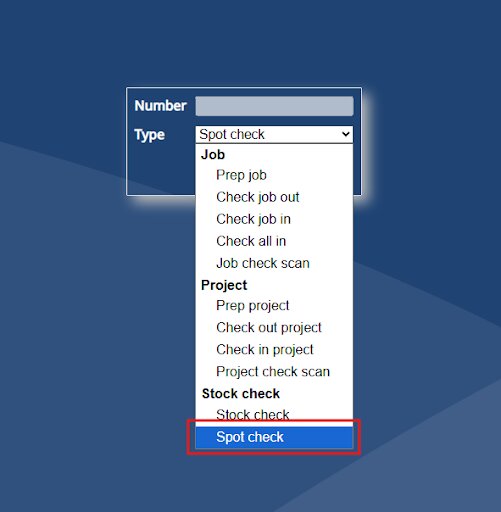
Asset Spot Checks: Perform warehouse-wide audits with the new ‘Spot Check’ feature. These checks are logged in Asset Status reports, showing exactly who performed the audit and when—perfect for maintaining an accurate inventory without stopping operations.
Product Cloning: Speed up your inventory setup by cloning existing products. This copies over images, categories, and autopulls, allowing you to quickly add similar items to your system without the headache of double entry.

Stock Check Exports: When performing a full stock check, you can now export your data directly to Excel. This allows for offline review and easier management of large-scale inventory adjustments.
3. Global Reach & User Experience
HireHop is looking (and moving) better than ever.
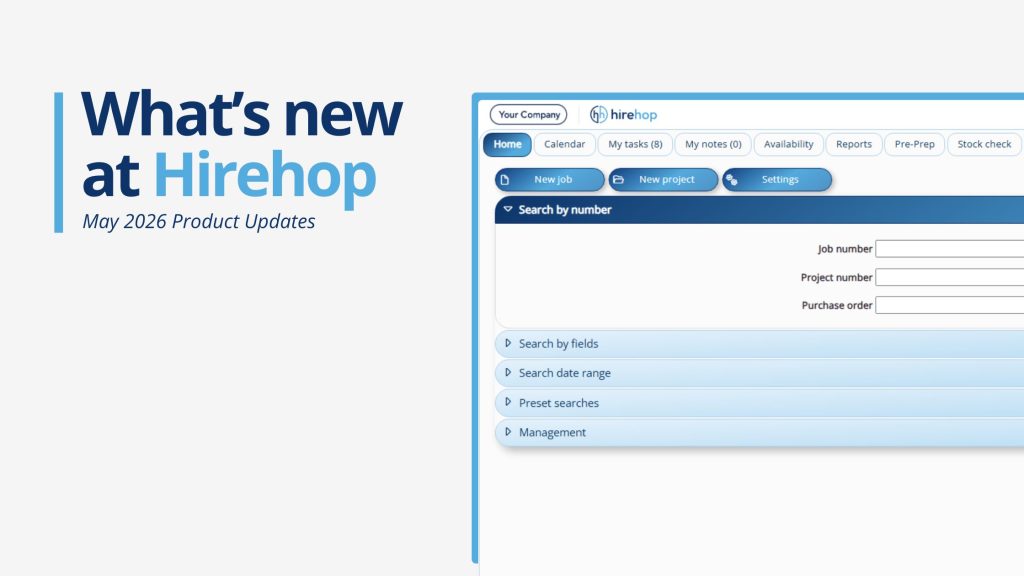
A Fresh Look: Try our new “Round” theme (or “Bubbles” as we like to call it) and enjoy a more modern interface with a compact header bar.

Smart Notifications: Stay updated with a new, compact header bar and a pop-out notification panel (look for the bell icon) designed to keep critical alerts front and center without cluttering your workspace.

System-Wide Speed Increase: Following a major code review, our latest version is faster across the board — even PDF generation is snappier!
Mobile-Friendly Framework: We are rolling out a new framework for Labour, Rental, Sales and the Address Book, making them faster and more responsive on mobile devices.
New Languages: We are thrilled to welcome our Chinese-speaking users with full language support.
4. For the Power Users & Developers
Live Data Copy (CDC): Subscribe to our Change Data Capture service to keep a live copy of your HireHop data on your own server for custom queries and total control.
Customisable Reports: You can now add or remove fields to tailor reports to your specific needs.

Multi-Select Custom Fields: Select multiple options within a custom field for better data categorisation.


API & Framework: We have unified our backend framework. Developers can check out the new Framework Guide and API Documentation.
The “Little Things” That Matter
-
Autopulled By: Ever wondered which kits a specific item belongs to? The new ‘Autopulled By’ menu option in Stock Management gives you a reverse-lookup of all kit dependencies.
-
Collaborative Tasks: Tasks now function like calendar invites. Assign a task to a colleague, and they can ‘Accept’ or ‘Decline’ directly from their dashboard.

-
Enhanced Category Drag-and-Drop: We’ve improved the visual indicators when reordering categories, making it much easier to see exactly where your items will land.
-
Stock Check Excel Export: Finalised your stock check? You can now jump straight to Excel with our new export tool for offline auditing.
-
Additional Merge Fields: We’ve expanded our document engine with even more merge fields, giving you deeper automation for your quotes and contracts.

Frequently asked questions
Does HireHop integrate with Microsoft Business Central?
Yes, HireHop now features a full integration with Microsoft Dynamics 365 Business Central, as well as FreeAgent and Exact.
You can read more about our Business Central integration here, and view all of our accounting integrations here.
How do I manage asset depreciation in HireHop?
Our new depreciation report allows you to set residual values as a percentage of the purchase price and manage bulk assets in compliance with international accounting standards.
Can I use RFID tags with HireHop?
Yes. We have added an “additional barcode” field specifically for RFID tags that cannot be programmed to match your primary asset barcode.
Is there a mobile-friendly version of HireHop?
Absolutely. We have implemented a new framework for Labour, Rental, Sales and the Address Book specifically to improve the mobile and tablet user experience.
What is the best cloud software for rental business migrations?
HireHop is designed specifically for seamless data migrations, offering a new framework and technical support to help businesses move from legacy systems to a modern, cloud-first workflow.
How Can We Help?
We know that with a list of updates this long, you might have questions about how to implement a specific feature into your unique workflow.
Whether you need help setting up the Business Central integration or want a walk-through of the new Availability Grid, our support team is ready to help. Click here to email them now.
Behind every line of code is our commitment to your success. Thank you for being part of the HireHop journey!